SpringBoot

第一个SpringBoot程序

官方提供了一个快速生成的网站, IDEA集成了这个网站

  • 可以在官网直接下载后, 导入IDEA开发
  • 直接使用IDEA创建一个SpringBoot项目(一般开发直接在IDEA中创建)

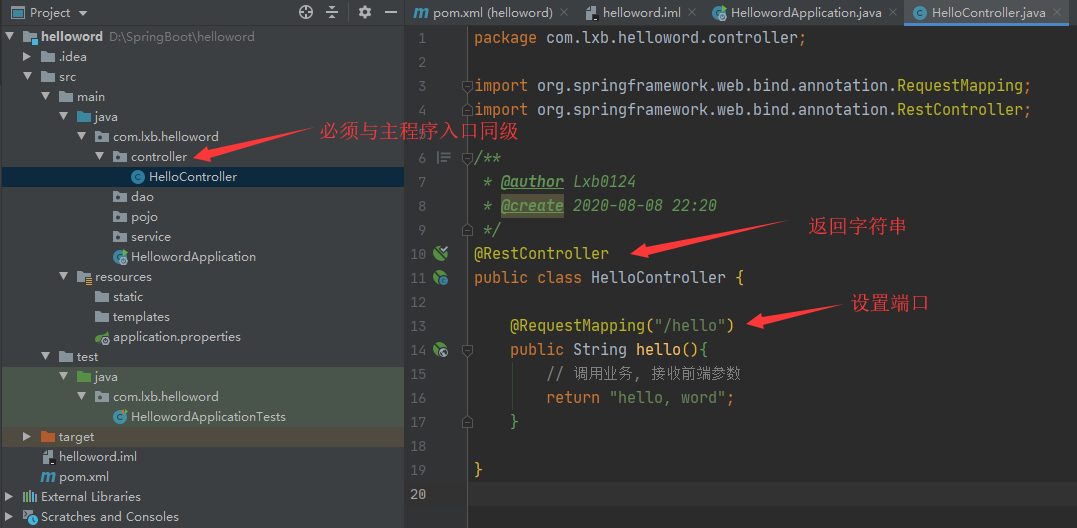
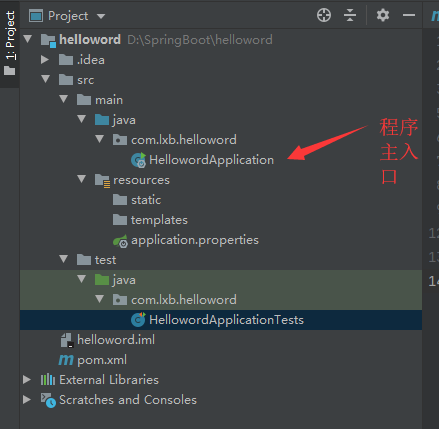
程序的结构为:
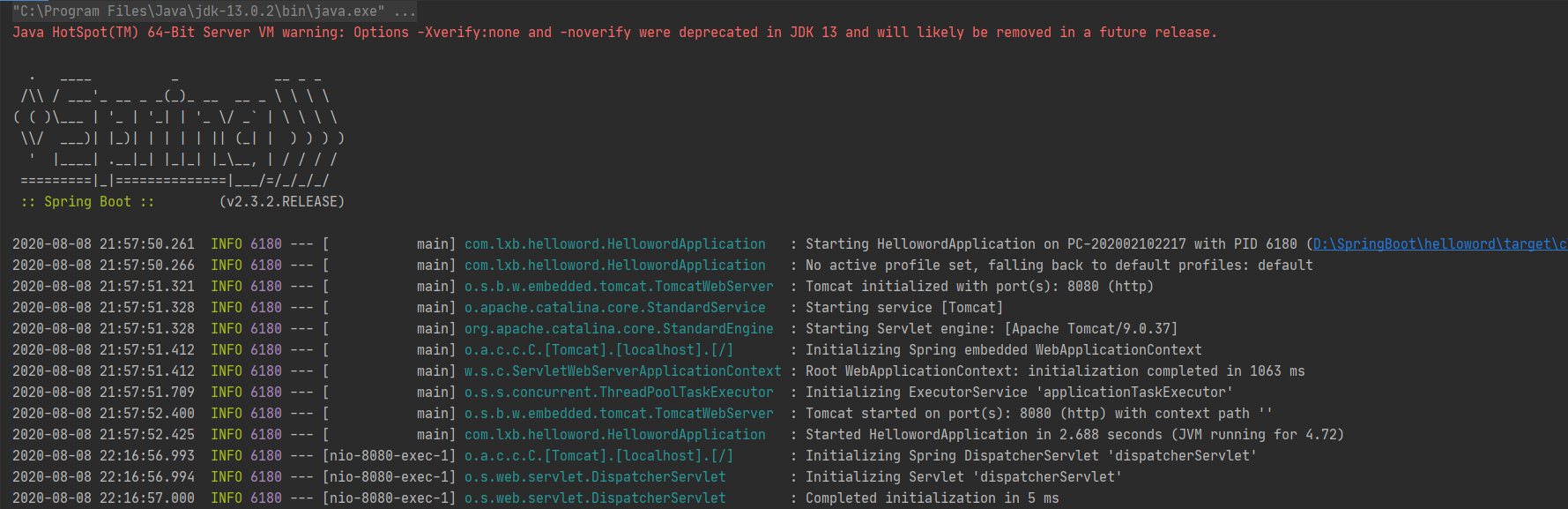
点击运行之后的输出为:
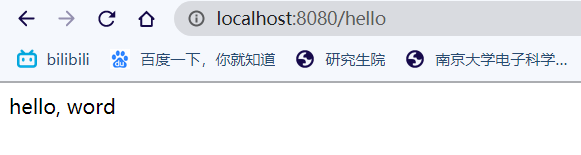
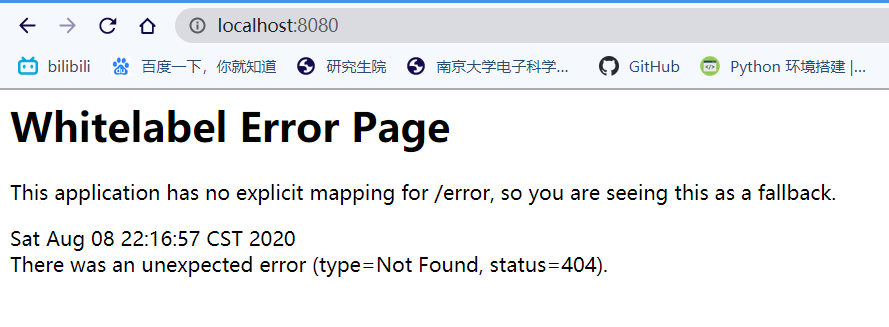
然后从浏览器打开8080端口:
下面开始写一些接口实现web操作:

  1. 创建包, 然后写之前SpringMVC中经常写的controller类

  2. 运行之后在浏览器中查看

*卧槽!!!Spring没配置!!! web.xml没配置!!!! Tomcat没配置!!!! *

主入口处的@SpringBootApplication 注解点进去之后发现这本质还是一个@Componet

再来看看porm.xml文件, 发现父项目的信息为:

1
2
3
4
5
6
<parent>
<groupId>org.springframework.boot</groupId>
<artifactId>spring-boot-starter-parent</artifactId>
<version>2.3.2.RELEASE</version>
<relativePath/> <!-- lookup parent from repository -->
</parent>

综合这两点, 得出本质上还是一个Spring实现

然后看依赖部分, 这个web依赖中集成了Tomcat服务器, dispatcherServlet, xml 等等等等, 都不需要我们再配置

1
2
3
4
5
6
7
8
9
10
11
12
13
14
15
16
17
18
<dependencies>
<dependency>
<groupId>org.springframework.boot</groupId>
<artifactId>spring-boot-starter-web</artifactId>
</dependency>

<dependency>
<groupId>org.springframework.boot</groupId>
<artifactId>spring-boot-starter-test</artifactId>
<scope>test</scope>
<exclusions>
<exclusion>
<groupId>org.junit.vintage</groupId>
<artifactId>junit-vintage-engine</artifactId>
</exclusion>
</exclusions>
</dependency>
</dependencies>

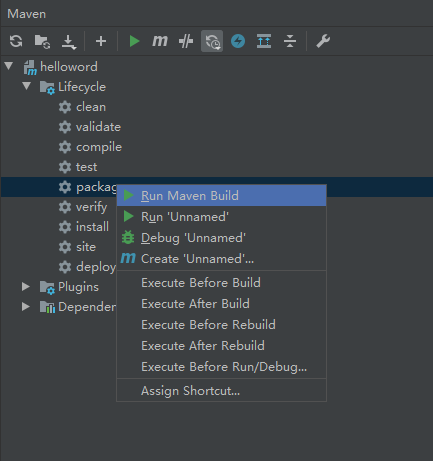
使用Maven的打包工具, 可以将当前项目打包(jar)

这里要注意Java编译器版本
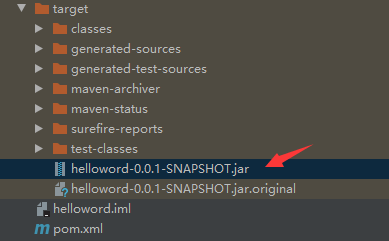
打包成功后可以看到输出目录中出现了打包好的jar包

在自带的springboot配置文件中可以自定义多个选项, 比如自定义端口号:
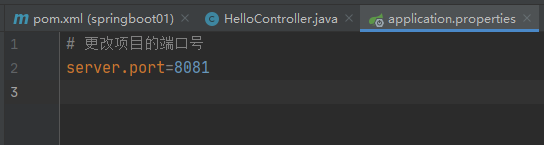
修改成功后:

*小彩蛋: *

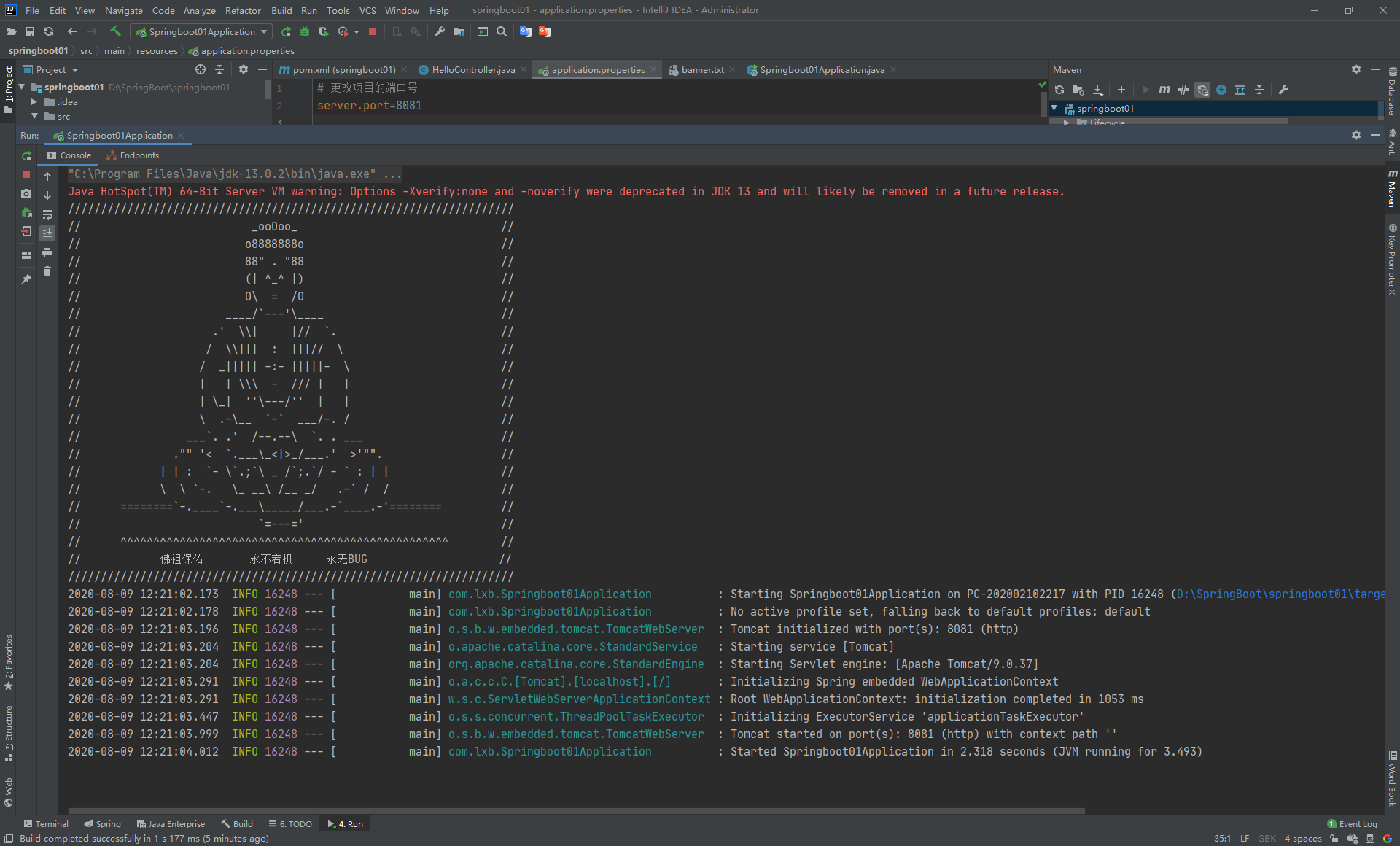
输出端口的图片可以自定义, 百度进入bootschool网站挑选一个有趣的图片, 然后在资源目录中新建一个banner.txt的文件, 把图片复制进去, 然后再运行程序:
原理初探

自动装配

porm.xml:

  • spring-boot-dependencies: 核心依赖在父工程中
  • 我们写或者引入一些SpringBoot依赖的时候, 不需要指定版本, 就因为有这些仓库

启动器:

  • <dependency>
        <groupId>org.springframework.boot</groupId>
        <artifactId>spring-boot-starter</artifactId>
    </dependency>
    
    1
    2
    3
    4
    5
    6
    7
    8
    9
    10
    11
    12
    13
    14
    15
    16
    17
    18
    19
    20

    说白了就是Springboot的启动场景

    比如spring-boot-starter-web, 会帮我们自动导入web环境所有的依赖

    * springboot会将所有的功能场景, 都变成一个个的启动器

    * 要使用什么功能, 找到对应的启动器即可

    主程序:

    ```java
    @SpringBootApplication
    public class Springboot01Application {

    public static void main(String[] args) {
    SpringApplication.run(Springboot01Application.class, args);
    }

    }
  • 注解@SpringBootApplication 标志着这是一个Springboot类

Springboot所有的自动配置都在启动的时候扫描并加载: spring.factories 所有的自动配置类都在这里面, 但是不一定生效, 要判断条件是否成立, 只要导入了对应的start, 就有对应的启动器, 自动装配就生效, 进而配置成功.

  1. Springboot在启动的时候, 从类路径下/META-INF/spring.factories获取指定的值
  2. 将这些自动配置的类导入容器, 自动配置类就会生效, 帮我们进行自动配置
  3. 以前我们需要自动配置的东西, 现在Springboot帮我们做了

配置文件

Springboot使用一个全局的配置文件, 配置文件名称是固定的

  • application.properties
    • 语法结构: key=value
  • application.yml
    • 语法结构: key: 空格 value

配置文件的作用: 修改Springboot自动配置的默认值, 因为Springboot在底层都给我们自动配置好了

1
2
3
4
5
6
7
8
9
10
11
12
13
14
15
16
17
18
19
20
21
name: lxb

# 对象
student:
name: lxb
age: 18

# 对象另一种写法
student2: {
name: lxb,
age: 18
}

# 数组
pets:
- cat
- dog
- pig

# 数组另一种写法
pets2: [cat, dog, pig]

相比之下, properties文件只能储存键值对

对空格和缩进的要求十分高

可以通过yaml文件实现对象的赋值

  1. 首先来看原生的方式:

    创建一个对象类

    1
    2
    3
    4
    5
    6
    7
    8
    9
    10
    11
    12
    13
    14
    15
    16
    17
    18
    19
    20
    21
    22
    23
    24
    25
    26
    27
    28
    29
    30
    31
    32
    33
    34
    35
    36
    37
    38
    39
    40
    41
    @Component
    public class Dog {

    @Value("旺财")
    private String name;
    @Value("3")
    private int age;

    public Dog() {

    }

    public Dog(String name, int age) {
    this.name = name;
    this.age = age;
    }

    public String getName() {
    return name;
    }

    public void setName(String name) {
    this.name = name;
    }

    public int getAge() {
    return age;
    }

    public void setAge(int age) {
    this.age = age;
    }

    @Override
    public String toString() {
    return "Dog{" +
    "name='" + name + '\'' +
    ", age=" + age +
    '}';
    }
    }

    然后在测试类中自动装配

    1
    2
    3
    4
    5
    6
    7
    8
    9
    10
    11
    12
    @SpringBootTest
    class Springboot01ApplicationTests {

    @Autowired
    private Dog dog;

    @Test
    void contextLoads() {
    System.out.println(dog);
    }

    }
  2. 通过yml赋值

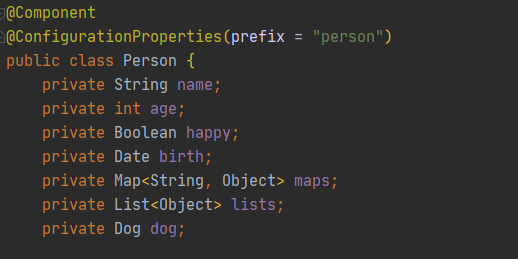
    首先编写一个Person类, 然后添加注解

    注意这里的第二个注解需要在porm.xml文件中添加依赖和插件:

1
2
3
4
5
6
7
8
9
10
11
12
13
14
15
16
17
18
<dependency>
<groupId>org.springframework.boot</groupId>
<artifactId>spring-boot-configuration-processor</artifactId>
<optional>true</optional>
</dependency>

<plugin>
<groupId>org.springframework.boot</groupId>
<artifactId>spring-boot-maven-plugin</artifactId>
<configuration>
<excludes>
<exclude>
<groupId>org.springframework.boot</groupId>
<artifactId>spring-boot-configuration-processor</artifactId>
</exclude>
</excludes>
</configuration>
</plugin>

​ 在yml文件中进行赋值:

1
2
3
4
5
6
7
8
9
10
11
12
13
person:
name: lxb
age: 18
happy: false
birth: 2020/08/09
maps: {k1: v1, k2: v2}
lists:
- code
- music
- girl
dog:
name: 旺财
age: 3

​ 然后测试:

1
2
3
4
5
6
7
8
9
10
11
@SpringBootTest
class Springboot01ApplicationTests {
@Autowired
private Person person;

@Test
void contextLoads() {
System.out.println(person);
}

}

​ 输出为:

  1. 也可以通过.properties文件赋值
    1. 首先创建配置文件xxx.properties
    2. 在定义的类上方添加注解@PropertySource(value="classpath:xxx.properties")
    3. 在具体的属性上方添加注解@Value("${xxx}")取出具体的属性

多环境配置

可以创建多个同级的配置文件, 分别为不同的场景使用, 比如测试环境, 开发环境等等, 为这些环境配置不同的端口或其他属性

在没有申明的情况下, 默认走application.properties中的配置, 如果需要使用其他配置, 可以设置spring.profiles.active=xxx, 可以选择激活哪一个配置文件

下面直接演示yaml配置文件

1
2
3
4
5
6
7
8
9
10
11
12
13
14
server:
port: 8081


---
server:
port: 8082
spring:
profiles: dev
---
server:
port: 8083
spring:
profiles: test

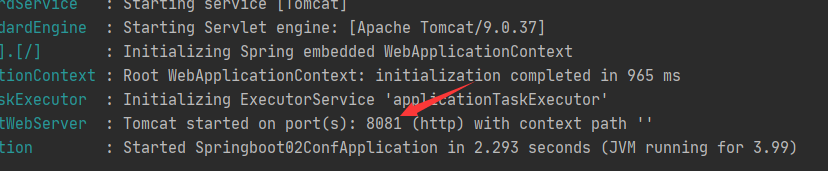
启动服务后, 输出为:

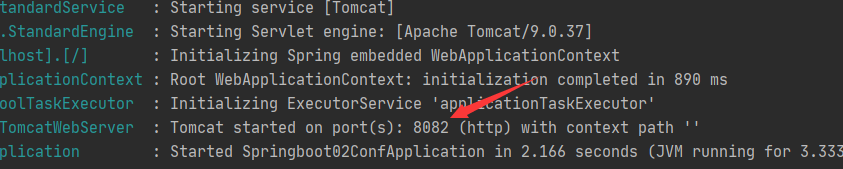
激活dev版本:

1
2
3
4
5
6
7
8
9
10
11
12
13
14
15
server:
port: 8081
spring:
profiles:
active: dev
---
server:
port: 8082
spring:
profiles: dev
---
server:
port: 8083
spring:
profiles: test

输出为:

如果使用.properties文件进行配置, 需要多个同级文件才能实现这样的效果

可以通过debug: true来查看, 哪些自动配置类生效, 哪些没有生效

1
debug: true

Web开发

  • xxxAutoConfiguration: 向容器中自动配置组件
  • xxxProperties: 自动配置类, 装配配置文件中自定义的一些内容

静态资源引入

  1. 通过webjars localhost:8080/webjars/
  2. public, static, /**, resources 目录下都可以检测到 localhost:8080/

优先级为:

​ resource > static(默认)>public

在默认的资源目录下, 创建一个index.html页面, 系统会将它视作工程的首页.

thymeleaf

  1. 首先在porm.xml中引入依赖

    1
    2
    3
    4
    5
    6
    7
    8
    9
    10
    <dependency>
    <groupId>net.sourceforge.nekohtml</groupId>
    <artifactId>nekohtml</artifactId>
    <version>1.9.22</version>
    </dependency>
    <!--解析html包-->
    <dependency>
    <groupId>org.springframework.boot</groupId>
    <artifactId>spring-boot-starter-thymeleaf</artifactId>
    </dependency>
  2. /templates目录下编写html页面

  3. 一些简单语法

    Simple expressions:

    • Variable Expressions: ${...}
    • Selection Variable Expressions: *{...}
    • Message Expressions: #{...}
    • Link URL Expressions: @{...}
    • Fragment Expressions: ~{...}

MVC配置

我们可以自定义一个MVC配置类, 在这类中可以编写视图解析器或者国际化组件等, 从而绕开springboot默认的各种组件

如果要自定义MVC配置类, 首先需要实现WebMvcConfigurer接口, 标明@Configuration注解, 并且不能带有@EnableWebMvc注解!!!

在SpringMVC阶段实现页面跳转是写Controller实现, 现在直接在自定义配置类中实现即可

1
2
3
4
5
6
7
8
9
10
@Configuration
public class MyMvcConfig implements WebMvcConfigurer {

@Override
public void addViewControllers(ViewControllerRegistry registry) {
registry.addViewController("/").setViewName("index");
registry.addViewController("/index.html").setViewName("index");
}

}

这样就能实现在localhost:8080/地址下或者localhost:8080/index.html地址下访问index.html页面

首页配置

所有的静态资源都要用thymeleaf接管

首先引入命名空间:

1
<html lang="en" xmlns:th="http://www.thymeleaf.org">

用thymeleaf接管所有的本地资源:

1
2
3
4
<!-- Bootstrap core CSS -->
<link th:href="@{/css/bootstrap.min.css}" rel="stylesheet">
<!-- Custom styles for this template -->
<link th:href="@{/css/signin.css}" rel="stylesheet">

国际化

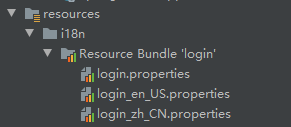
首先创建一个配置文件收录所有需要国际化的标签

编写需要国际化的内容
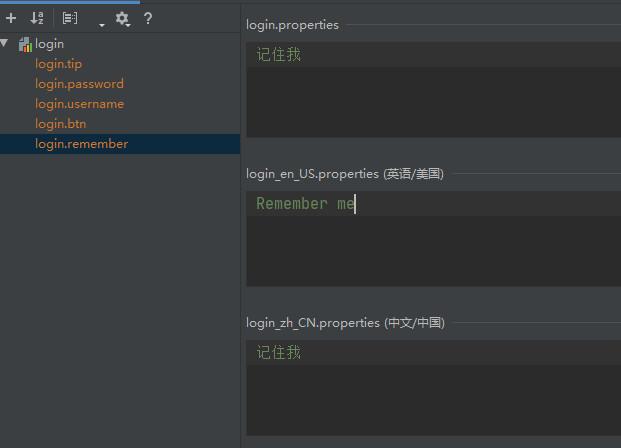
在spring.messages.basename=i18n.login添加该配置文件信息

从前端页面发送国际化的请求:

然后编写解析器来解析发送来的国际化请求

1
2
3
4
5
6
7
8
9
10
11
12
13
14
15
16
17
18
19
20
21
public class MyLocalResolver implements LocaleResolver {
@Override
public Locale resolveLocale(HttpServletRequest httpServletRequest) {
// 获取请求中的语言参数
String language = httpServletRequest.getParameter("l");
// 如果没有就使用默认的
Locale locale = Locale.getDefault();
// 如果请求的链接携带了国际化的参数
if(!StringUtils.isEmpty(language)){
String[] s = language.split("_");
locale = new Locale(s[0], s[1]);
}

return locale;
}

@Override
public void setLocale(HttpServletRequest httpServletRequest, HttpServletResponse httpServletResponse, Locale locale) {

}
}

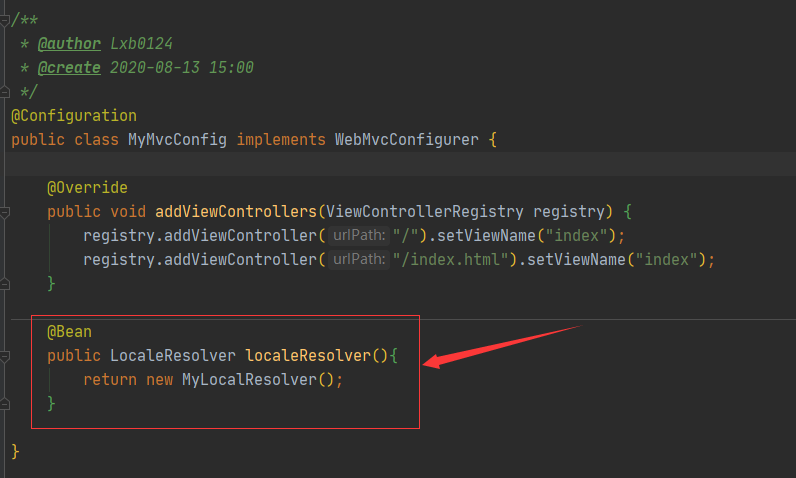
将该本地化解析器组件放入自定义的MVC配置类中

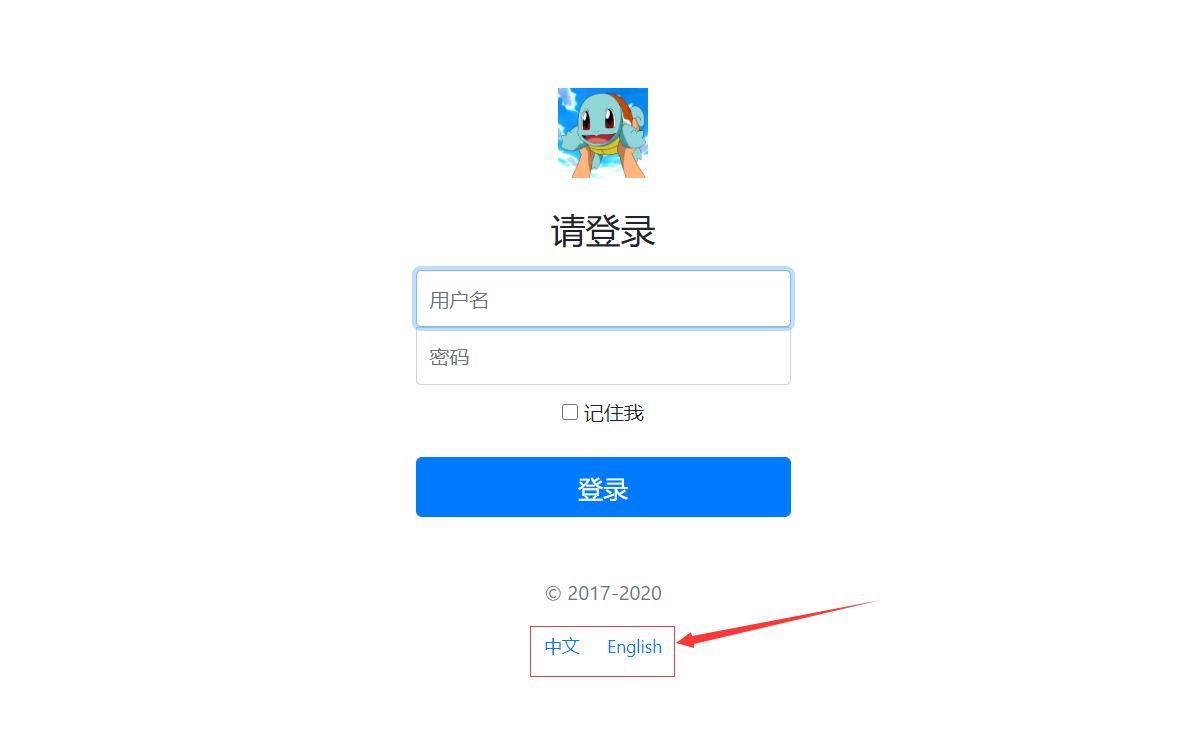
然后在首页就可以进行中英文切换了
CRUD功能

直接看项目代码即可

DATA

连接JDBC

建立与数据库的连接, 需要用到Spring Data框架
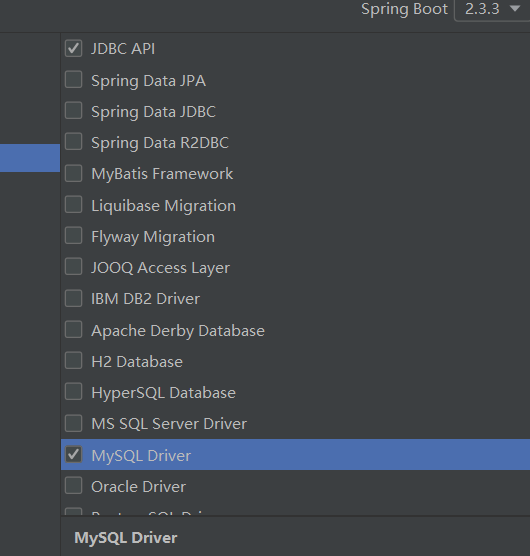
勾选相关的依赖

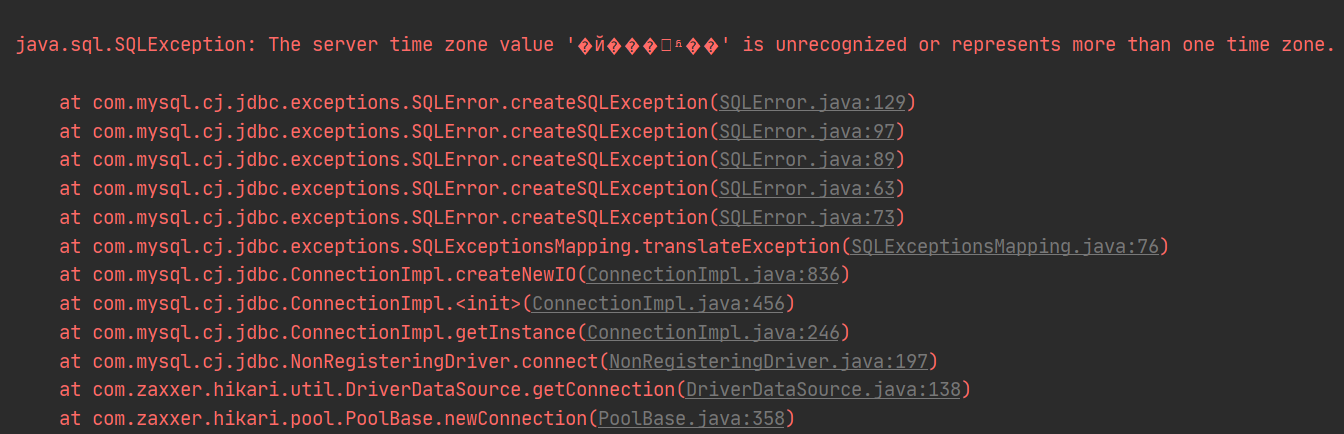
在填写之前的url后, 尝试查看连接信息,会报出时区异常

1
2
3
4
5
6
7
8
9
10
11
12
13
14
15
@SpringBootTest
class Springboot05ApplicationTests {

@Autowired
DataSource dataSource;

@Test
void contextLoads() throws SQLException {
System.out.println(dataSource.getClass());
Connection connection = dataSource.getConnection();
System.out.println(connection);
connection.close();
}

}

所以, 配置文件应该修改如下:

1
2
3
4
5
6
spring:
datasource:
username: root
password: 123456
url: jdbc:mysql://localhost:3306/mybatis?useSSL=false&useUnicode=true&characterEncoding=UTF-8&serverTimezone=UTC
driver-class-name: com.mysql.cj.jdbc.Driver

然后就可以正常输出, 说明数据库连接成功:

然后通过SpringBoot自带的JDBCTemplate类就可以进行CRUD操作

1
2
3
4
5
6
7
8
9
10
11
12
13
14
@RestController
public class JDBCController {
@Autowired
JdbcTemplate jdbcTemplate;

// 查询数据库的所有连接
@GetMapping("/userList")
public List<Map<String, Object>> userList(){
String sql = "select * from mybatis.student";
List<Map<String, Object>> mapsList = jdbcTemplate.queryForList(sql);
return mapsList;
}

}

在网页可以看到输出为:

自定义数据源->DRUID

Druid是阿里巴巴开源平台上一个数据源连接池实现, 结合了C3P0, DBCP, PROXOO等DB池的优点, 同时加入了日志监控.

首先引入数据源依赖:

1
2
3
4
5
6
<!-- https://mvnrepository.com/artifact/com.alibaba/druid -->
<dependency>
<groupId>com.alibaba</groupId>
<artifactId>druid</artifactId>
<version>1.1.21</version>
</dependency>

在yml文件中指定数据源

1
2
3
4
5
6
7
spring:
datasource:
username: root
password: 123456
url: jdbc:mysql://localhost:3306/mybatis?useSSL=false&useUnicode=true&characterEncoding=UTF-8&serverTimezone=UTC
driver-class-name: com.mysql.cj.jdbc.Driver
type: com.alibaba.druid.pool.DruidDataSource

再次测试连接, 查看连接信息:

发现数据源已经从Hikari换成了Druid

接下来配置Druid的配置文件:

1
2
3
4
5
6
7
8
9
10
11
12
13
14
15
16
17
18
19
20
21
22
23
24
spring:
datasource:
username: root
password: 123456
url: jdbc:mysql://localhost:3306/mybatis?useSSL=false&useUnicode=true&characterEncoding=UTF-8&serverTimezone=UTC
driver-class-name: com.mysql.cj.jdbc.Driver
type: com.alibaba.druid.pool.DruidDataSource

initialSize: 5
minIdle: 5
maxActive: 20
maxWait: 60000
timeBetweenEvictionRunsMillis: 60000
minEvictableIdleTimeMillis: 300000
validdationQuery: SELECT 1 FROM DUAL
testWhileIdle: true
testOnBorrow: false
testOnReturn: false
poolPreparedStatements: true

filters: stat,wall,log4j
maxPoolPreparedStatementPerConnectionSize: 20
useGlobalDataSourceStat: true
connectionProperties: druid.stat.mergeSql=true;druid.stat.slowSqlMillis=500

然后编写配置类: 因为Springboot内置了servlet容器,所以没有web.xml

1
2
3
4
5
6
7
8
9
10
11
12
13
14
15
16
17
18
19
20
21
22
23
24
25
26
@Configuration
public class DruidConfig {

@ConfigurationProperties(prefix = "spring.datasource")
@Bean
public DataSource druidDataSource() {
return new DruidDataSource();
}

@Bean
public ServletRegistrationBean statViewServlet() {
ServletRegistrationBean<StatViewServlet> bean
= new ServletRegistrationBean<>(new StatViewServlet(), "/druid/*");
// 后台需要有人登录
HashMap<String, String> initParameters = new HashMap<>();
// 增加配置
initParameters.put("loginUsername", "admin");
initParameters.put("loginPassword", "123456");

// 允许谁可以访问
initParameters.put("allow", "");

bean.setInitParameters(initParameters);
return bean;
}
}

这里就相当于web.xml文件, 只不过是用注解的形式写出来

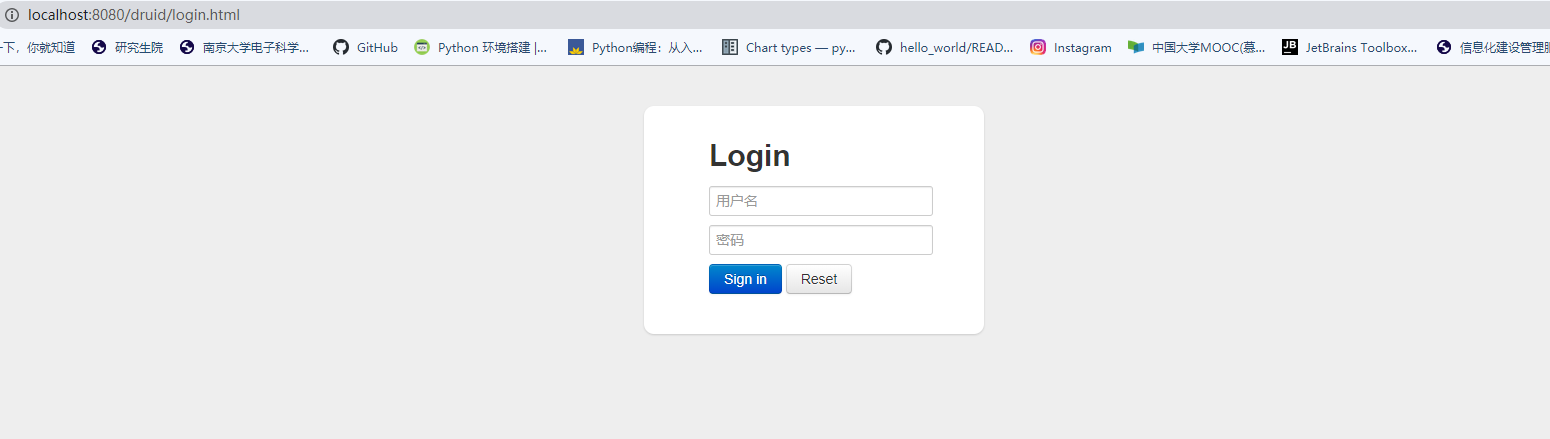
然后在浏览器地址栏输入

1
http://localhost:8080/druid

就会显示登录Druid后台监控页面

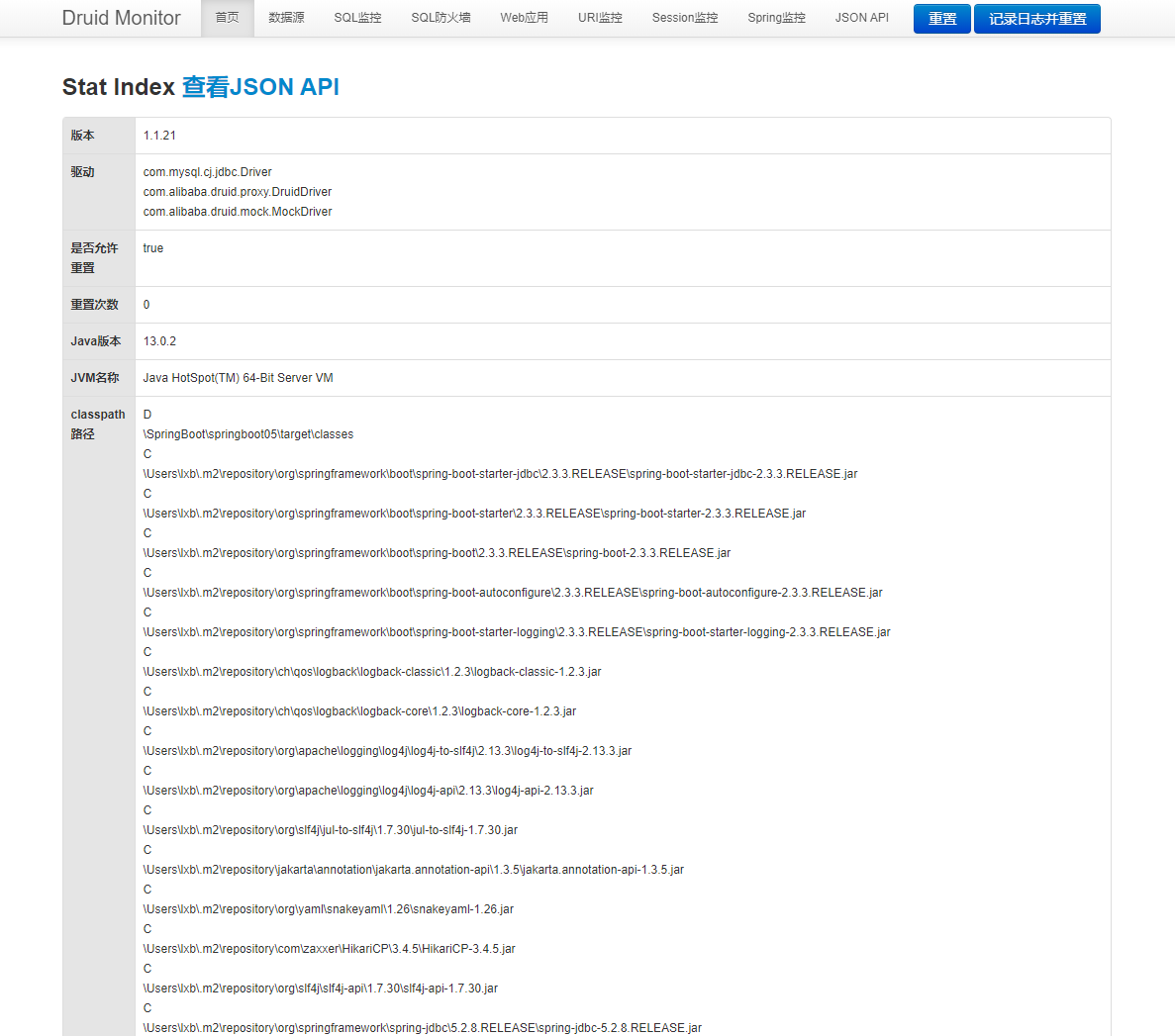
再打开一个窗口进行数据库查询操作, 然后返回后台监控的SQL监控页面, 可以看到查询信息:

在Druid的配置类中可以添加过滤器

1
2
3
4
5
6
7
8
9
10
11
12
13
@Bean
public FilterRegistrationBean webStatFilter() {
FilterRegistrationBean bean = new FilterRegistrationBean();

bean.setFilter(new WebStatFilter());

//可以过滤哪些请求?
Map<String, String> initParameters = new HashMap<>();
initParameters.put("exclusions", "*.js,*.css,/druid/*");
bean.setInitParameters(initParameters);
return bean;

}

整合Mybatis

首先是整合包

mybatis-spring-boot-starter

1
2
3
4
5
6
<!-- https://mvnrepository.com/artifact/org.mybatis.spring.boot/mybatis-spring-boot-starter -->
<dependency>
<groupId>org.mybatis.spring.boot</groupId>
<artifactId>mybatis-spring-boot-starter</artifactId>
<version>2.1.1</version>
</dependency>

然后来配置数据库信息

1
2
3
4
5
6
spring:
datasource:
username: root
password: 123456
url: jdbc:mysql://localhost:3306/mybatis?useSSL=false&useUnicode=true&characterEncoding=UTF-8&serverTimezone=UTC
driver-class-name: com.mysql.cj.jdbc.Driver

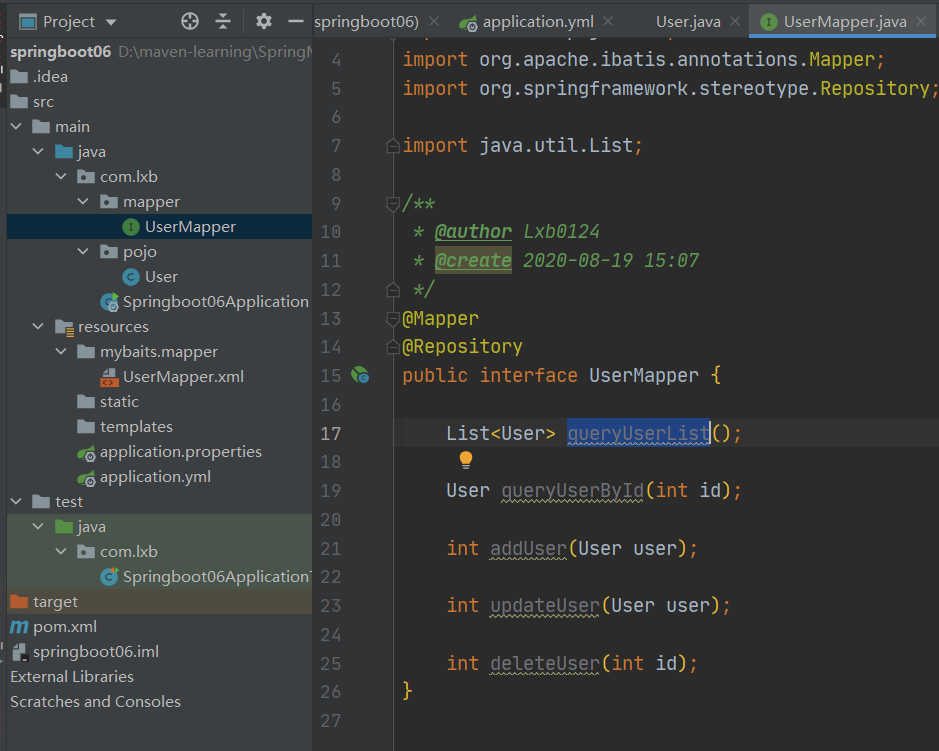
然后编写mapper接口

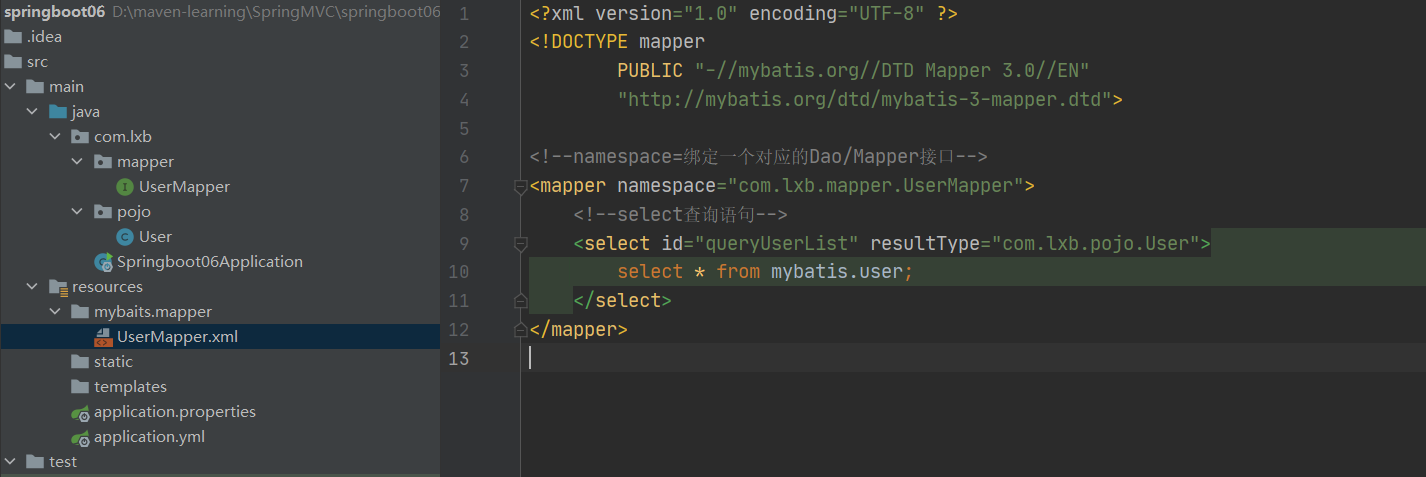
然后去配置具体的xml文件实现接口

在yml文件中进行映射的绑定, 整合mybatis,

1
2
3
mybatis:
type-aliases-package: com.lxb.pojo
mapper-locations: classpath:mybatis/mapper/*.xml

Shiro

首先新建一个web项目, 搭建最基础的框架, 导入thymeleaf依赖

导入springboot整合的依赖

1
2
3
4
5
6
7
8
9
10
<dependency>
<groupId>org.apache.shiro</groupId>
<artifactId>shiro-spring-boot-starter</artifactId>
<version>1.6.0</version>
</dependency>
<dependency>
<groupId>org.apache.shiro</groupId>
<artifactId>shiro-spring</artifactId>
<version>1.6.0</version>
</dependency>

然后编写Config代码, 先自定义一个Realm类, 需要继承AuthorizingRealm

1
2
3
4
5
6
7
8
9
10
11
12
13
14
public class UserRealm extends AuthorizingRealm {

@Override
protected AuthorizationInfo doGetAuthorizationInfo(PrincipalCollection principalCollection) {
System.out.println("执行了-> doGetAuthorizationInfo方法");
return null;
}

@Override
protected AuthenticationInfo doGetAuthenticationInfo(AuthenticationToken authenticationToken) throws AuthenticationException {
System.out.println("执行了-> doGetAuthenticationInfo方法");
return null;
}
}

第一个方法为授权, 第二个方法为认证

然后编写核心的配置类

1
2
3
4
5
6
7
8
9
10
11
12
13
14
15
16
17
18
19
20
21
22
23
24
25
@Configuration
public class ShiroConfig {
// shiroFilterFactoryBean
@Bean
public ShiroFilterFactoryBean getShiroFilterFactoryBean(@Qualifier("defaultWebSecurityManager")
DefaultWebSecurityManager defaultWebSecurityManager) {
ShiroFilterFactoryBean shiroFilterFactoryBean = new ShiroFilterFactoryBean();
shiroFilterFactoryBean.setSecurityManager(defaultWebSecurityManager);
return shiroFilterFactoryBean;
}

// DefaultWebSecurityManager
@Bean
public DefaultWebSecurityManager defaultWebSecurityManager(@Qualifier("userRealm") UserRealm userRealm) {
DefaultWebSecurityManager securityManager = new DefaultWebSecurityManager();
securityManager.setRealm(userRealm);
return securityManager;
}

// 创建Realm对象, 需要自定义
@Bean
public UserRealm userRealm() {
return new UserRealm();
}
}

登录拦截

anon:无需认证就可访问

authc: 必须认证了才能访问

user:必须拥有记住我功能才能使用

perm:拥有对某个资源的权限才能访问

role:拥有某个角色权限才能访问

将需要登录拦截的页面写进哈希表中, 并标明拦截等级

在最后要设置登录请求, 意为如果没有权限则要进行登录

1
2
3
4
5
6
7
8
9
10
11
12
13
14
15
16
17
18
@Bean
public ShiroFilterFactoryBean getShiroFilterFactoryBean(@Qualifier("defaultWebSecurityManager")
DefaultWebSecurityManager defaultWebSecurityManager) {
ShiroFilterFactoryBean shiroFilterFactoryBean = new ShiroFilterFactoryBean();
// 设置安全管理器
shiroFilterFactoryBean.setSecurityManager(defaultWebSecurityManager);

Map<String, String> filterMap = new LinkedHashMap<>();
// filterMap.put("/user/add", "authc");
// filterMap.put("/user/update", "authc");
filterMap.put("/user/*", "authc");
shiroFilterFactoryBean.setFilterChainDefinitionMap(filterMap);

// 设置登录请求
shiroFilterFactoryBean.setLoginUrl("/toLogin");

return shiroFilterFactoryBean;
}

编写一个简单的登录页面, 然后传递用户名和密码信息

编写相应的Controller类, 对提交的信息进行处理

1
2
3
4
5
6
7
8
9
10
11
12
13
14
15
16
17
18
19
20
21
22
@RequestMapping("/login")
public String login(@RequestParam("username") String username,
@RequestParam("password") String password,
Model model) {

// 获取当前用户
Subject subject = SecurityUtils.getSubject();

// 封装用户的登录数据
UsernamePasswordToken token = new UsernamePasswordToken(username, password);
// 执行登录的方法, 如果没有异常就OK
try {
subject.login(token);
return "index";
} catch (UnknownAccountException e) {
model.addAttribute("msg", "用户名不错误");
return "login";
} catch (IncorrectCredentialsException e) {
model.addAttribute("msg", "密码错误");
return "login";
}
}

其中执行subject.login()方法时, 会跳转到Realm中进行认证处理, 处理的对象就是用户名和密码组成的token

1
2
3
4
5
6
7
8
9
10
11
12
13
14
15
16
17
18
@Override
protected AuthenticationInfo doGetAuthenticationInfo(AuthenticationToken token) throws AuthenticationException {
System.out.println("执行了-> doGetAuthenticationInfo方法");

// 用户名和密码, 从数据库中取
String name = "root";
String password = "123456";

UsernamePasswordToken userToken = (UsernamePasswordToken) token;
// 用户名认证
if (!userToken.getUsername().equals(name)) {
// 抛出异常, UnknownAccountException
return null;
}

// 密码认证, Shiro做
return new SimpleAuthenticationInfo("", password, "");
}

整合Mybatis

至此, 只要连接上数据库, 就能够完成真实的登录拦截操作, 并且可以进一步完善授权的功能

首先导入数据库所需的依赖, 有mybatis整合包, 数据库连接池, 日志, 数据库连接

1
2
3
4
5
6
7
8
9
10
11
12
13
14
15
16
17
18
19
<dependency>
<groupId>mysql</groupId>
<artifactId>mysql-connector-java</artifactId>
</dependency>
<dependency>
<groupId>com.alibaba</groupId>
<artifactId>druid</artifactId>
<version>1.1.21</version>
</dependency>
<dependency>
<groupId>log4j</groupId>
<artifactId>log4j</artifactId>
<version>1.2.12</version>
</dependency>
<dependency>
<groupId>org.mybatis.spring.boot</groupId>
<artifactId>mybatis-spring-boot-starter</artifactId>
<version>2.1.1</version>
</dependency>

配置数据连接池

1
2
3
4
5
6
7
8
9
10
11
12
13
14
15
16
17
18
19
20
21
22
23
24
spring:
datasource:
username: root
password: 123456
url: jdbc:mysql://localhost:3306/mybatis?useSSL=false&useUnicode=true&characterEncoding=UTF-8&serverTimezone=UTC
driver-class-name: com.mysql.cj.jdbc.Driver
type: com.alibaba.druid.pool.DruidDataSource

initialSize: 5
minIdle: 5
maxActive: 20
maxWait: 60000
timeBetweenEvictionRunsMillis: 60000
minEvictableIdleTimeMillis: 300000
validdationQuery: SELECT 1 FROM DUAL
testWhileIdle: true
testOnBorrow: false
testOnReturn: false
poolPreparedStatements: true

filters: stat,wall,log4j
maxPoolPreparedStatementPerConnectionSize: 20
useGlobalDataSourceStat: true
connectionProperties: druid.stat.mergeSql=true;druid.stat.slowSqlMillis=500

配置Mybatis

1
2
3
mybatis:
type-aliases-package: com.lxb.pojo
mapper-locations: classpath:mybatis/mapper/*.xml

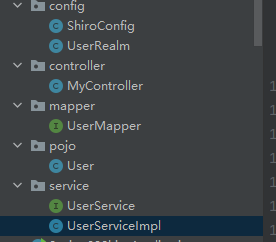
编写相应的pojo类和mapper接口

pojo类就略过, 按照数据库表单进行创建即可, 这里的mapper接口使用注解的方式查询用户对象

1
2
3
4
5
6
7
8
@Repository
@Mapper
public interface UserMapper {

@Select("select * from mybatis.user where name = #{name}")
public User queryByName(@Param("name") String name);

}

然后编写Service层的代码

1
2
3
4
5
6
7
8
9
10
11
12
@Service
public class UserServiceImpl implements UserService{

@Autowired
UserMapper userMapper;

@Override
public User queryByName(String name) {
return userMapper.queryByName(name);
}

}

然后对已经写好的功能进行测试

1
2
3
4
5
6
7
8
9
10
11
12
13
@SpringBootTest
class Spring09ShiroApplicationTests {

@Autowired
UserServiceImpl userService;

@Test
void contextLoads() {
User user = userService.queryByName("Jay");
System.out.println(user);
}

}

输出结果正确:

1
2
2020-08-29 17:29:29.792  INFO 5312 --- [           main] com.alibaba.druid.pool.DruidDataSource   : {dataSource-1} inited
User{id=3, name='Jay', pwd='123456'}

在配置文件的mybatis下添加以下配置, 可以打印日志

1
2
configuration:
log-impl: org.apache.ibatis.logging.stdout.StdOutImpl

输出为:

1
2
3
4
5
6
7
8
9
10
11
Creating a new SqlSession
SqlSession [org.apache.ibatis.session.defaults.DefaultSqlSession@1c00d406] was not registered for synchronization because synchronization is not active
2020-08-29 17:36:10.420 INFO 4340 --- [ main] com.alibaba.druid.pool.DruidDataSource : {dataSource-1} inited
JDBC Connection [com.mysql.cj.jdbc.ConnectionImpl@2b395581] will not be managed by Spring
==> Preparing: select * from mybatis.user where name = ?
==> Parameters: Jay(String)
<== Columns: id, name, pwd
<== Row: 3, Jay, 123456
<== Total: 1
Closing non transactional SqlSession [org.apache.ibatis.session.defaults.DefaultSqlSession@1c00d406]
User{id=3, name='Jay', pwd='123456'}

然后将真实数据库连接到Shiro的登录拦截中, 修改realm中的认证代码

1
2
3
4
5
6
7
8
9
10
11
12
13
14
15
16
@Override
protected AuthenticationInfo doGetAuthenticationInfo(AuthenticationToken token) throws AuthenticationException {
System.out.println("执行了-> doGetAuthenticationInfo方法");

UsernamePasswordToken userToken = (UsernamePasswordToken) token;
// 连接真实数据库
User user = userService.queryByName(userToken.getUsername());

if (user == null) {
// 用户不存在
return null;
}

// 密码认证, Shiro做
return new SimpleAuthenticationInfo("", user.getPwd(), "");
}

授权

针对不同用户的权限划分出不同功能

在数据库中添加表示权限的列,然后在pojo实体类中添加相应的属性
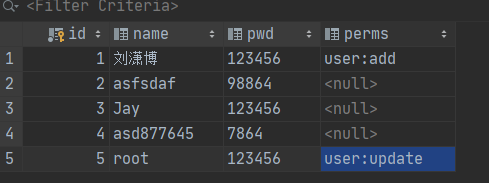
在配置类中编写授权代码, 指明访问addupdate页面需要验证权限

1
2
3
4
5
6
7
8
9
10
11
12
13
14
15
16
17
18
19
20
21
22
23
24
25
@Bean
public ShiroFilterFactoryBean getShiroFilterFactoryBean(@Qualifier("defaultWebSecurityManager")
DefaultWebSecurityManager defaultWebSecurityManager) {
ShiroFilterFactoryBean shiroFilterFactoryBean = new ShiroFilterFactoryBean();
// 设置安全管理器
shiroFilterFactoryBean.setSecurityManager(defaultWebSecurityManager);

// 拦截
Map<String, String> filterMap = new LinkedHashMap<>();

// 授权, 正常情况下没有授权会跳转到特定的页面
filterMap.put("/user/add", "perms[user:add]");
filterMap.put("/user/update", "perms[user:update]");

filterMap.put("/user/*", "authc");
shiroFilterFactoryBean.setFilterChainDefinitionMap(filterMap);

// 设置登录请求
shiroFilterFactoryBean.setLoginUrl("/toLogin");

// 设置未授权请求
shiroFilterFactoryBean.setUnauthorizedUrl("/noauth");

return shiroFilterFactoryBean;
}

这里是拦截下来, 对拦截下来的用户需要进行处理, 在realm中进行

1
2
3
4
5
6
7
8
9
10
11
12
13
14
@Override
protected AuthorizationInfo doGetAuthorizationInfo(PrincipalCollection principalCollection) {
System.out.println("执行了-> doGetAuthorizationInfo方法");

SimpleAuthorizationInfo info = new SimpleAuthorizationInfo();

// 拿到当前登录的这个对象
Subject subject = SecurityUtils.getSubject();
User currentUser = (User) subject.getPrincipal();

info.addStringPermission(currentUser.getPerms());

return info;
}

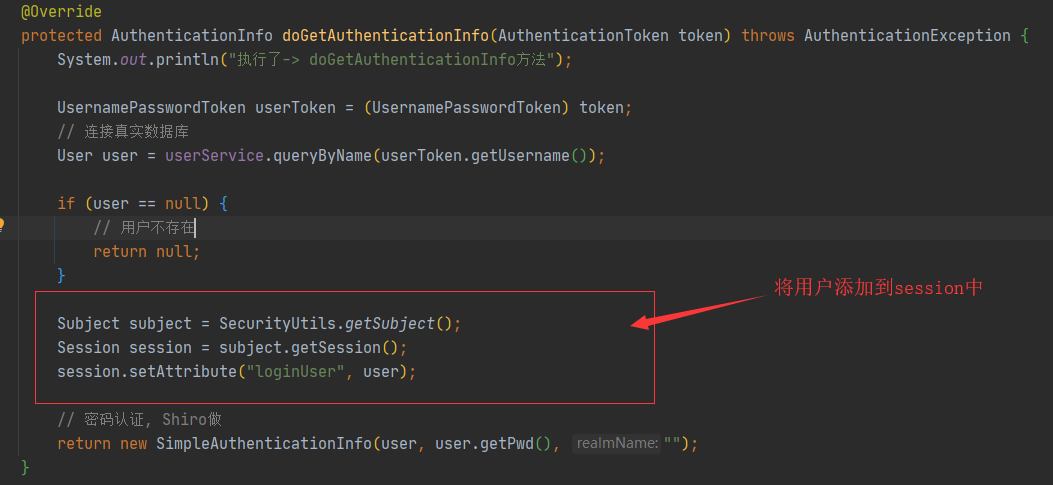
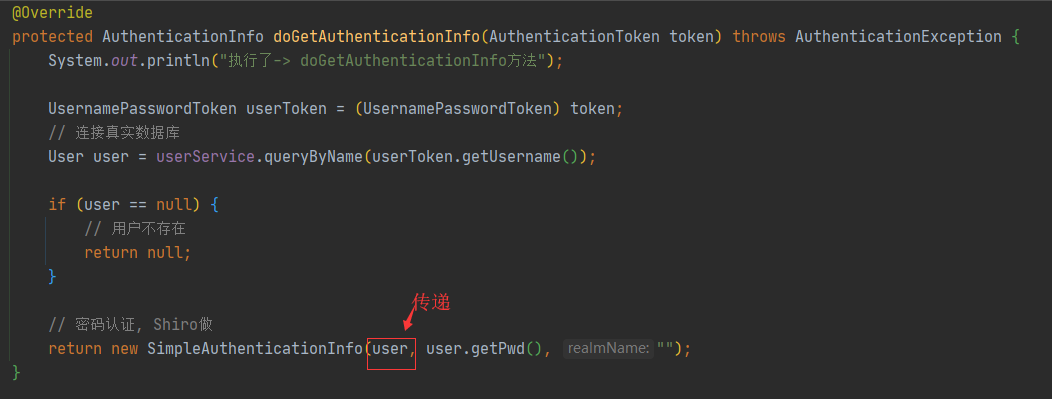
对当前登录的用户进行权限认证, 那么当前用户是怎么传递进来的呢? 答案是在realm的认证过程传递的:
整合Thymeleaf

整合Thymeleaf的目的是为了实现不同权限的用户登录之后显示的内容不同.

首先导入整合的包

1
2
3
4
5
6
<!-- https://mvnrepository.com/artifact/com.github.theborakompanioni/thymeleaf-extras-shiro -->
<dependency>
<groupId>com.github.theborakompanioni</groupId>
<artifactId>thymeleaf-extras-shiro</artifactId>
<version>2.0.0</version>
</dependency>

在前端验证是否登录还是通过session, 在后端查找到登录的用户后将其添加到session

在前端页面添加一个判断语句即可

1
2
3
<div th:if="${session.loginUser==null}">
<a th:href="@{/toLogin}">登录</a>
</div>

任务

异步任务

在Springboot中可以通过注解@Async开启一个线程
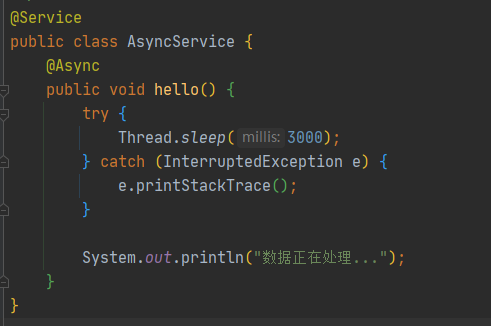
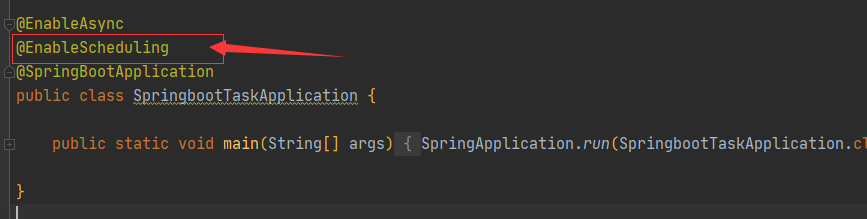
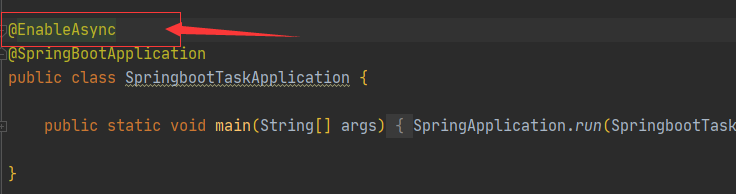
然后在主函数中开启线程开关
这样配置之后, 调用该服务时系统就会自动开辟一个线程执行该方法
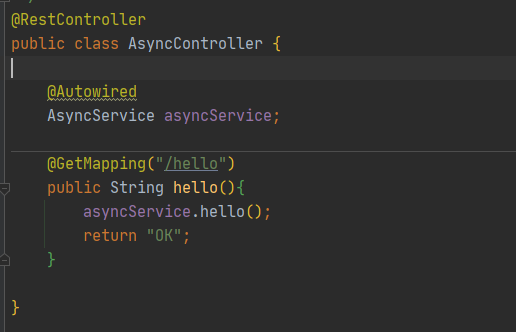
经过测试之后, 如果如果不加该注解, 必须要等到3秒以才能在页面中看到OK, 添加了该注解, 就有另外的线程去执行这3秒的休眠, 返回OK的操作与此无关

定时任务

  • TaskScheduler
  • TaskExecutor

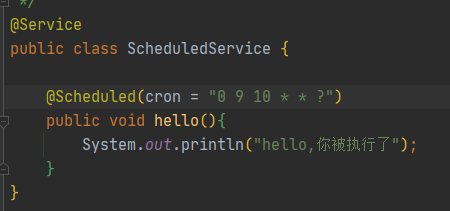
这样就可以给任务添加定时功能了, 其中的cron表达式专门用于调度任务的执行时间

分布式 Dubbo+Zookeeper

Dubbo

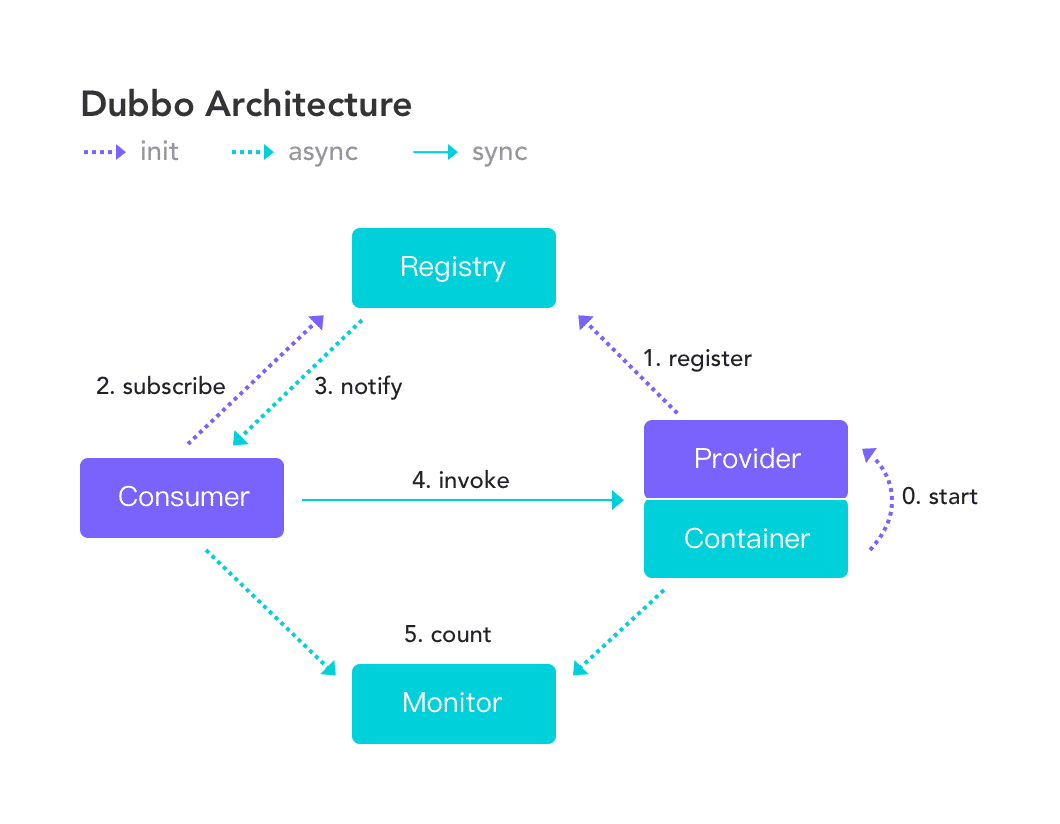
一款高性能,轻量级的开源Java RPC框架, 它提供了三大核心功能: 面向接口的远程方法调用, 智能容错和负载均衡, 以及服务自动注册和实现
-------------本文结束感谢您的阅读-------------
可以请我喝杯奶茶吗